
Vector's Single-Threaded UDP Bottleneck: Scaling to 75k syslog messages/sec with rsyslog Fan-Out
Posted on October 5, 2026 • 16 minutes • 3397 words
Introduction
A handful of our firewalls and NVAs were emitting around 35,000 syslog messages per second. At roughly 1,100 bytes per message that is ~38 MB/s of UDP, and every single packet was landing on one core of an 8 vCPU VM. Vector was pinning a vCPU at 100%, the kernel’s UDP receive buffer was overflowing, and UdpRcvbufErrors was climbing. Messages were being dropped before Vector ever saw them.
The root cause is not a bug. Vector’s socket (UDP) and syslog (UDP) sources are single-threaded: all packets enter one queue and are processed sequentially by one receive loop. This is documented behaviour, and it has been discussed at length in vectordotdev/vector#22132
. You can throw 16 cores at Vector and it will still saturate at the same per-core ceiling, because the UDP receive path itself — not the pipeline — is the bottleneck.
Making it worse, our NVAs all send from the same source IP and the same source port. Azure’s Standard Load Balancer hashes on the 5-tuple (source IP, source port, destination IP, destination port, protocol). With a single source port, every single flow hashes to the same backend VM. The load balancer was effectively a pass-through, and we had no way to spread the ingest across a pool of log collectors.
This is a write-up of the workaround that got us from 35k msg/s with packet loss to 75k msg/s with zero loss on a single 8 vCPU VM — by putting rsyslog in front of Vector to create worker threads, bumping the kernel UDP buffers to 64 MB, and having Vector listen on a loopback TCP port.
The Symptoms
The first thing I noticed was that adding cores did nothing. Vector’s own vector top showed one CPU pegged and the rest idle. The classic diagnostic commands told the rest of the story:
# Kernel UDP statistics: errors and receive-buffer overflows
$ nstat -az | grep -iE 'udp'
UdpInDatagrams                  48213991      0.0
UdpInErrors                      9123844      0.0   # ← non-zero and climbing
UdpNoPorts                              0      0.0
UdpRcvbufErrors                  9123844      0.0   # ← buffer overflow = dropped packets
UdpSndbufErrors                         0      0.0
UdpInCsumErrors                         0      0.0

# The socket Vector is listening on, and its receive buffer
$ ss -lunm 'sport = :514'
State   Recv-Q   Send-Q   Local Address:Port   Peer Address:Port
UNCONN  0        0        0.0.0.0:514          0.0.0.0:*
         skmem:(r0,rb212992,t0,tb212992,f0,w0,o0,bl0,d0)
         #                              ^^^^^^^ ~208 KB, nowhere near enough
UdpRcvbufErrors increments when a datagram arrives and the socket receive buffer is full, so the kernel has no choice but to drop it. UDP has no retransmission, so that message is simply gone. The 208 KB default buffer drains in a fraction of a millisecond at 38 MB/s.
Why Vector’s UDP Source Can’t Scale
Vector’s threading model differs by source. From the discussion in #22132 , a rough guide:
| Source | Threading model |
|---|---|
socket (UDP) |
Single-threaded — all packets enter one queue, processed sequentially |
syslog (UDP) |
Same single-threaded limitation |
socket (TCP) |
Concurrent per connection — each TCP stream gets its own task |
http |
Concurrent per request |
kafka |
One async task per partition consumer |
kubernetes_logs |
Single file-watching loop with async reads |
For UDP, the socket is the serializer. There is exactly one receive loop calling recvfrom() (or recvmmsg()) on one thread, no matter how many cores you have:
Vector UDP source — one receiver, one queue:

   NIC ──▶ kernel UDP rcvbuf ──▶ [ single recv loop ] ──▶ [ pipeline ] ──▶ sinks
                                  (1 vCPU, serialized)
The 70 MB/s ceiling reported in the GitHub thread on a 16-core box is exactly this: one receive loop hitting its per-core limit while the other cores sit idle because there is no work to distribute to them.
What the community suggested
The maintainers and contributors in that thread suggested a few practical options:
- Run multiple Vector instances, each bound to a different UDP port, and load-balance across ports at the sender or with a hardware LB.
- Switch to TCP syslog, since the TCP socket source handles connections concurrently.
- Use a UDP fan-out proxy in front of Vector (the thread suggested
stunnel/socat), forwarding to one or more Vector instances. - Batch UDP reads with
recvmmsg()(there is a batching PR, but it is still single-threaded).
Option 1 doesn’t help us, because the load balancer already collapses everything onto one VM and we cannot change the NVA source ports. Option 3 with socat made things worse — socat is itself effectively single-threaded per direction and just moved the bottleneck. What worked was option 3 done with rsyslog, which can genuinely receive UDP on multiple worker threads.
The Azure Load Balancer Curveball
This is the constraint that shaped the whole design. Azure Standard Load Balancer distributes flows, not packets, using a hash of the 5-tuple:
5-tuple hash = hash(src IP, src port, dst IP, dst port, protocol)
Our NVAs are appliances that send syslog from a fixed source IP and a fixed source port. The destination (the LB frontend IP and port 514) is also fixed. So there is effectively one flow, and one flow hashes to exactly one backend:
   NVA / Firewall fleet  ── 35,000 syslog msgs/sec (~1.1 KB each) ──┐
   (all send from the SAME source IP + SAME source port)            │
                                                                    ▼
                                                          ┌───────────────────┐
                                                          │  Azure Standard   │
                                                          │  Load Balancer    │
                                                          │  5-tuple hash:    │
                                                          │  src IP, src port,│
                                                          │  dst IP, dst port,│
                                                          │  protocol         │
                                                          └─────────┬─────────┘
                                                                    │  one flow ⇒ one backend
                                                                    ▼
                                             ┌───────────────────────────────────────┐
                                             │  VM-1 (8 vCPU)                         │
                                             │                                        │
                                             │  Vector socket/syslog source (UDP)     │
                                             │  ── SINGLE receive loop ──▶ 1 vCPU 🔥  │
                                             │                                        │
                                             │  UDP rcvbuf overflow                   │
                                             │  UdpRcvbufErrors ↑  ⇒  PACKETS DROPPED │
                                             └───────────────────────────────────────┘
If we controlled the senders, rsyslog’s RebindInterval
directive would let them periodically close and reopen their UDP send socket so the source port changes, which is exactly the standard trick to keep load balancers honest. But these are vendor appliances; we cannot touch their configuration. So the only lever we control is what runs on the single backend VM — and it has to absorb the entire 38 MB/s firehose on its own.
Why rsyslog Fixes What Vector Can’t
Here is the key detail that makes this work. rsyslog’s imudp module can run multiple worker threads, and — unlike a naive fan-out proxy — all of those workers pull from the same UDP socket in parallel:
- Every worker thread adds the listen port to an
epoll()set and waits for packets. - Each worker calls
recvmmsg()to grab a batch of datagrams in one syscall, reducing kernel/user transitions. - When many workers are active, one worker can be reading from the kernel buffer while another is processing the batch it already read. At high volume this keeps the buffer drained.
Vector UDP source:               rsyslog imudp (threads=N):

  socket ──▶ [ 1 recv loop ]      socket ──▶ [ worker 0  recvmmsg ─┐
                                              [ worker 1  recvmmsg ─┤
                                              [ worker 2  recvmmsg ─┼─▶ ruleset queue
                                              [   ... N workers ...  ┤
                                              (all pull from the      ┘
                                               SAME socket)
So a single-source-port flow — the exact thing that defeats the Azure LB and Vector’s one receive loop — is now drained by N cores. rsyslog then forwards over TCP on loopback, which is a reliable, back-pressured transport: if Vector is momentarily slow, TCP applies backpressure and rsyslog’s queue grows instead of the kernel silently dropping UDP packets. Vector listens as a TCP source, which is concurrent per connection, and rsyslog’s omfwd TCP target pool opens one connection per target, giving us real fan-out into multiple Vector receive tasks.
The New Architecture
   NVA / Firewall fleet  ── 35k–75k syslog msgs/sec ─────────────┐
   (unchanged: same source IP, same source port)                 │
                                                                 ▼
                                                       ┌───────────────────┐
                                                       │  Azure Standard   │
                                                       │  Load Balancer    │  ← still pins
                                                       └─────────┬─────────┘     to VM-1
                                                                 ▼
   ┌───────────────────────────── VM-1 (8 vCPU, 64 MB UDP buffers) ─────────────────────────────┐
   │                                                                                            │
   │   ┌──────────────────────────── rsyslog ────────────────────────────┐                      │
   │   │ imudp: threads=8, batchSize=32, rcvbufSize=64m  (recvmmsg)      │                      │
   │   │        │                                                        │                      │
   │   │        ▼  ruleset queue (fixedArray, 250k slots, 8 workers)     │                      │
   │   │   omfwd: TCP target pool 127.0.0.1:[1514,1515,1516,1517]        │                      │
   │   └───────┬──────────────┬──────────────┬──────────────┬───────────┘                      │
   │           │ conn 1       │ conn 2       │ conn 3       │ conn 4    (loopback TCP)          │
   │           ▼              ▼              ▼              ▼                                    │
   │   ┌──────────── Vector (socket source, mode=tcp) ─────────────┐                             │
   │   │  vec_in_0     vec_in_1     vec_in_2     vec_in_3          │  ← per-connection tasks     │
   │   │   :1514        :1515        :1516        :1517            │                             │
   │   └──────┬────────────┬────────────┬────────────┬────────────┘                             │
   │          └────────────┴─────┬──────┴────────────┘                                           │
   │                             ▼  remap → parse_syslog() → enrichment                          │
   │                     [ sinks: Splunk / Elasticsearch / S3 ]                                  │
   └────────────────────────────────────────────────────────────────────────────────────────────┘
The flow, end to end:
- NVAs send UDP syslog to the Azure LB, exactly as before.
- The LB still pins everything to VM-1 — we did not (and cannot) fix that.
- rsyslog’s
imudpdrains the single UDP flow with 8 worker threads using batchedrecvmmsg()reads and a 64 MB receive buffer. - rsyslog pushes messages into a large in-memory queue, decoupling reception from forwarding.
omfwdround-robins the messages across a TCP target pool of four loopback listeners (127.0.0.1:1514-1517), opening one connection per target.- Vector runs four
socketsources in TCP mode. Because the TCP source is concurrent per connection, this gives us four concurrent receive tasks instead of one serialized loop. - The parsed events flow through the normal Vector pipeline into the sinks.
Step 1: Increase the Kernel UDP Buffers
This is non-negotiable. If you only do one thing, do this. The default rmem_max on most distros is ~208 KB, which is a rounding error at 38 MB/s.
# /etc/sysctl.d/99-syslog-tuning.conf
#
# Socket receive buffer: allow rsyslog's imudp to request 64 MB.
# rmem_max MUST be >= the rcvbufSize you configure in rsyslog,
# otherwise the kernel silently clamps the request.
net.core.rmem_max = 67108864
net.core.rmem_default = 67108864

# Backlog for packets handed from the NIC to the network stack.
# Azure VMs use accelerated networking, but this still helps during bursts.
net.core.netdev_max_backlog = 250000

# Keep at least 256 KB per UDP socket, and allow the UDP memory
# pool to grow to ~1 GB under pressure. Values are in 4 KB pages.
net.ipv4.udp_rmem_min = 65536
net.ipv4.udp_mem = 65536 131072 262144

# Accept queue for any listener (loopback TCP fan-in)
net.core.somaxconn = 4096
Apply and verify:
$ sudo sysctl --system
$ sysctl net.core.rmem_max net.core.netdev_max_backlog
net.core.rmem_max = 67108864
net.core.netdev_max_backlog = 250000

# Confirm the socket actually got the big buffer (look at the 'rb' value)
$ ss -lunm 'sport = :514'
State   Recv-Q   Send-Q   Local Address:Port   Peer Address:Port
UNCONN  0        0        0.0.0.0:514          0.0.0.0:*
         skmem:(r0,rb67108864,t0,tb212992,f0,w0,o0,bl0,d0)
         #              ^^^^^^^^^^ 64 MB — good
How big should the buffer be? It depends on how fast your messages arrive and how long your worst-case forwarding stall lasts. Start at 64 MB, watch UdpRcvbufErrors, and go up only if it is still non-zero under peak load. There is no point allocating gigabytes “just in case” — each buffer is pinned kernel memory.
Step 2: rsyslog as the Multi-Threaded UDP Fan-Out Proxy
This is the heart of the fix. rsyslog listens on UDP 514 with multiple worker threads, queues messages, and forwards them over a TCP target pool to Vector on loopback.
# /etc/rsyslog.d/10-vector-fanout.conf

# ---------------------------------------------------------------------------
# Global: a writable work directory for internal state
# ---------------------------------------------------------------------------
global(
    workDirectory="/var/spool/rsyslog"
    maxMessageSize="64k"
)

# ---------------------------------------------------------------------------
# Input: UDP syslog with 8 receive worker threads and a 64 MB socket buffer.
#
#   threads   - number of imudp worker threads pulling from the SAME socket.
#               Size this to your vCPU count (max 32).
#   batchSize - max datagrams fetched per recvmmsg() call. Fewer syscalls
#               means less kernel/user transition overhead at high volume.
#   rcvbufSize - request a 64 MB SO_RCVBUF (requires net.core.rmem_max).
# ---------------------------------------------------------------------------
module(load="imudp"
       threads="8"
       batchSize="32"
       timeRequery="8")

input(type="imudp"
      address="0.0.0.0"
      port="514"
      rcvbufSize="64m"
      ruleset="vector_fanout")

# ---------------------------------------------------------------------------
# Template: pass the message through unmodified, one LF-delimited line.
# We deliberately do NOT parse in rsyslog — Vector will do that, so the
# hot path here stays as cheap as possible.
# ---------------------------------------------------------------------------
template(name="rawlf" type="string" string="%rawmsg%\n")

# ---------------------------------------------------------------------------
# Ruleset: a big in-memory queue decouples receive from forwarding.
# If Vector briefly stalls, TCP backpressure fills this queue instead of
# the kernel dropping UDP datagrams.
# ---------------------------------------------------------------------------
ruleset(name="vector_fanout"
        queue.type="fixedArray"
        queue.size="250000"
        queue.highWaterMark="200000"
        queue.lowWaterMark="150000"
        queue.discardMark="240000"
        queue.workerThreads="8"
        queue.dequeueBatchSize="512"
        queue.timeoutWorkerthreadShutdown="2000") {

    # -----------------------------------------------------------------------
    # omfwd TCP target pool = the fan-out.
    #
    #   target = array of hosts  -> rsyslog forms a load-balanced pool and
    #                               round-robins across online targets.
    #   port   = matching array  -> first port for first target, etc.
    #
    # All four targets are the same loopback host on DIFFERENT ports, so we
    # get four independent TCP connections into four Vector listeners,
    # each handled by its own Vector task.
    # -----------------------------------------------------------------------
    action(type="omfwd"
           name="vector_pool"
           target=["127.0.0.1","127.0.0.1","127.0.0.1","127.0.0.1"]
           port=["1514","1515","1516","1517"]
           protocol="tcp"
           template="rawlf"
           TCP_Framing="traditional"
           keepAlive="on"
           keepAlive.interval="30"
           action.resumeRetryCount="-1"
           action.resumeInterval="5"
           action.reportSuspension="on"
           queue.type="linkedList"
           queue.size="100000")
}

# ---------------------------------------------------------------------------
# Optional but strongly recommended: emit rsyslog's internal counters so you
# can see queue depth, imudp worker activity, and the action pool health.
# ---------------------------------------------------------------------------
module(load="impstats"
       interval="60"
       severity="7"
       log.syslog="off"
       log.file="/var/log/rsyslog-stats.log"
       resetCounters="off")
A few things worth calling out:
targetas an array forms a pool. Per the rsyslog docs, an array of targets enables round-robin delivery among online targets, unreachable hosts are removed and retried every 30 seconds, and pools require TCP. That is exactly the “fan-out proxy” behaviour we want, implemented natively.portas an array maps one-to-one withtarget. The first port is used for the first target, and so on. This is how we get four distinct loopback connections from one action.TCP_Framing="traditional"means LF-delimited messages, which matches Vector’s default newline framing. If your logs can contain embedded newlines, switch tooctet-countedand configure Vector’slength_delimitedframing instead — but for single-line firewall/syslog traffic, traditional is fine and cheaper.- Two levels of queueing.
imudpworkers push into the ruleset queue; the action has its own queue feeding the pool. This is what absorbs microbursts without dropping. - Sizing note: total threads =
imudp.threads(8) +queue.workerThreads(8) + the action’s queue workers. Do not blindly set everything to vCPU count — oversubscribing the box can reduce throughput while increasing CPU use. The rsyslog docs explicitly warn about this. Start low, measure withimpstats, and add threads only when the data says it helps.
Step 3: Vector Listens on Loopback TCP
Vector now does what its TCP source is good at: accept multiple connections and process each one concurrently. Use the socket source in mode = "tcp", one listener per pool port.
# /etc/vector/vector.toml
data_dir = "/var/lib/vector"

# ---------------------------------------------------------------------------
# Four TCP listeners on loopback. rsyslog's omfwd target pool opens one
# connection to each. Vector's TCP socket source is concurrent per
# connection, so these are four parallel receive tasks instead of the
# single serialized UDP receive loop we started with.
# ---------------------------------------------------------------------------
[sources.vec_in_0]
type    = "socket"
address = "127.0.0.1:1514"
mode    = "tcp"

[sources.vec_in_1]
type    = "socket"
address = "127.0.0.1:1515"
mode    = "tcp"

[sources.vec_in_2]
type    = "socket"
address = "127.0.0.1:1516"
mode    = "tcp"

[sources.vec_in_3]
type    = "socket"
address = "127.0.0.1:1517"
mode    = "tcp"

# ---------------------------------------------------------------------------
# One transform shared by all four sources. parse_syslog() turns the raw
# line into structured fields (facility, severity, hostname, appname,
# message, ...).
# ---------------------------------------------------------------------------
[transforms.parse]
type    = "remap"
inputs  = ["vec_in_0", "vec_in_1", "vec_in_2", "vec_in_3"]
source = '''
. = parse_syslog!(string!(.message))
.seen_by = "vm-1"
'''

# ---------------------------------------------------------------------------
# Sink (example: Elasticsearch/OpenSearch). Tune batching for throughput.
# ---------------------------------------------------------------------------
[sinks.opensearch]
type         = "elasticsearch"
inputs       = ["parse"]
endpoints    = ["https://opensearch.internal:9200"]
bulk.index   = "firewall-syslog-%Y.%m.%d"
batch.max_events     = 5000
batch.timeout_secs   = 5
request.concurrency  = "adaptive"
If you want even more Vector-side parallelism, run one Vector process per port and pin each to distinct cores with systemd’s CPUAffinity, or use Vector’s [api] + vector top to confirm the load is actually spread.
# systemd drop-in to pin Vector to a core (optional, per instance)
# /etc/systemd/system/vector.service.d/affinity.conf
[Service]
CPUAffinity=2-5
Verifying the Fix
Watch the drop counters. This is the whole ballgame:
# Before: this climbs continuously. After: it must stay flat at 0.
$ watch -n2 "nstat -az | grep -E 'UdpInDatagrams|UdpRcvbufErrors'"

UdpInDatagrams                69123011      0.0
UdpRcvbufErrors                      0      0.0   # ← zero drops

# rsyslog internal stats: imudp worker throughput + queue depth
$ tail -f /var/log/rsyslog-stats.log
#   imudp(w0)  msgs.received: 2.1M  called.recvmmsg: 68k
#   imudp(w3)  msgs.received: 2.0M  called.recvmmsg: 66k
#   vecpool    queue.size=0  messages.sent=8.4M  num.connects=4

# Vector internal metrics
$ vector top
Two things I specifically looked for:
UdpRcvbufErrorsflat at zero. If it is still climbing, your buffer is too small or you do not have enoughimudpthreads — or the CPU is simply saturated and you need more cores.- All
imudpworkers active, not justw0. If one worker is doing everything, thethreadsparameter is not taking effect or the volume is too low to need them.
Results
On the same 8 vCPU VM, with no change to the NVAs or the Azure LB:
| Metric | Before (Vector UDP direct) | After (rsyslog fan-out → Vector TCP) |
|---|---|---|
| Sustained throughput | ~35k msg/s | ~75k msg/s |
| Bytes/sec (~1.1 KB/msg) | ~38 MB/s | ~82 MB/s |
| CPU usage | 1 vCPU pinned at 100%, 7 idle | spread across cores |
UdpRcvbufErrors |
climbing continuously | 0 |
| UDP packet loss | yes, under peak | none observed |
| Backend VMs | 1 (LB constraint) | 1 (LB constraint unchanged) |
| Per-message transport | UDP end to end | UDP → loopback TCP → Vector |
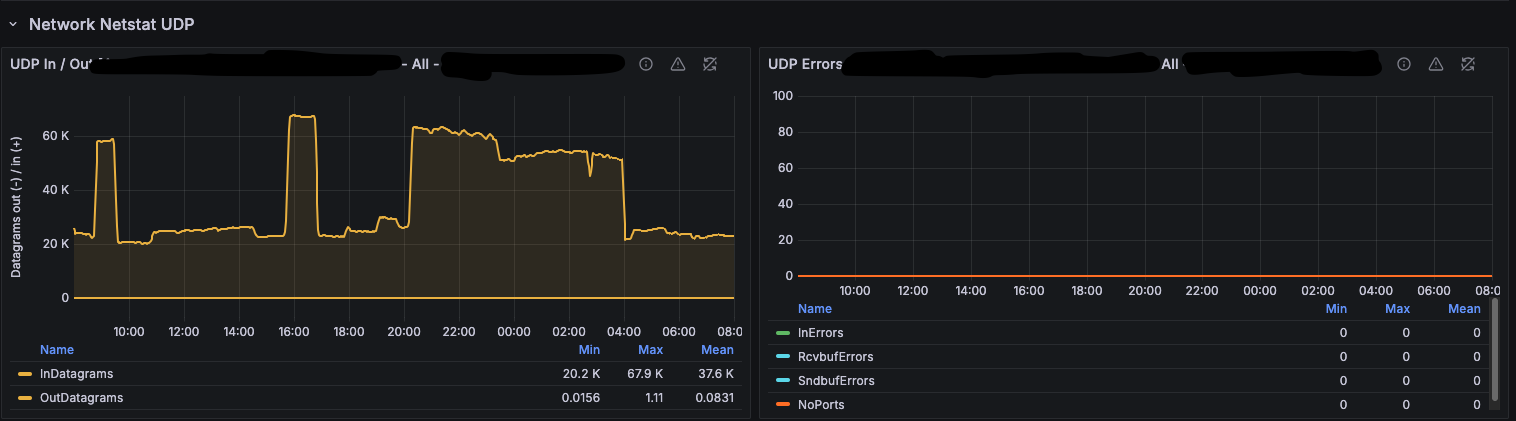
Grafana: UDP throughput over a 24-hour window (top) with every UDP error counter pinned at zero (bottom) — sustained bursts up to ~68k datagrams/sec with no receive-buffer errors and no packet loss.
We more than doubled throughput and eliminated UDP drops, and we did it without being able to fix the actual architectural problem — a vendor appliance using a single source port behind a 5-tuple-hashing load balancer.
Trade-offs and Gotchas
This is a pragmatic workaround, not a free lunch. Be honest about what you are adding:
- An extra hop. Every message now traverses rsyslog → loopback TCP → Vector. On loopback the latency is sub-millisecond, but it is real. If your SLA is measured in microseconds, measure it.
- One more thing to operate. rsyslog is now in the critical path. If it dies, logs stop. Monitor it (that is what
impstatsis for), and make it a proper systemd service with restart-on-failure. - Ordering is no longer guaranteed across the four pooled connections. For firewall/syslog analytics this is almost always irrelevant, but if downstream correlation depends on strict ordering, this design will not give it to you.
- Framing mismatch is the classic footgun.
traditional(LF) framing splits multi-line messages. If any log source can emit embedded newlines, useoctet-countedend to end. - Buffers cost memory. A 64 MB socket buffer plus 250k queue slots is not free. Size deliberately.
- Upstream UDP is still UDP. rsyslog protects you from loss after the kernel socket, not before. If the NIC or the network drops a packet in flight from the NVA, it is still gone. This design makes the receiver fast enough to not be the reason packets are dropped; it does not make UDP reliable.
- The real fixes are structural. Fix the NVA so it uses ephemeral source ports (then the LB will spread the flows), or terminate syslog on multiple ingress points, or wait for Vector to gain a multi-threaded/
recvmmsgUDP source. If you control the senders, rsyslog’sRebindIntervalon the sending side rotates the source port and is a much cleaner way to keep the load balancer honest.
Summary
Vector’s UDP source being single-threaded is a fundamental limitation, and when a single-source-port flow defeats your load balancer’s 5-tuple hashing, you cannot fix it from the sender side. The move that works is to stop asking Vector to receive the UDP flood at all:
- rsyslog
imudpwiththreads = vCPU countdrains a single UDP flow with batchedrecvmmsg()reads across many cores. - Increase kernel UDP buffers to 64 MB (
net.core.rmem_max) so the socket has room to breathe during bursts. - rsyslog forwards over a loopback TCP target pool — reliable, back-pressured, and natively load-balanced across targets.
- Vector listens on loopback TCP (
socketsource,mode = "tcp"), which is concurrent per connection, giving real fan-in parallelism and eliminating the serialized receive loop.
That took one 8 vCPU VM from 35k messages/sec with packet loss to 75k messages/sec with zero UDP loss, under an architectural constraint we could not change. It is not elegant, but it is honest, and it works.
References
- vectordotdev/vector discussion #22132 — Vector CPU Utilisation
- Vector
socketsource documentation - rsyslog
imudpmodule (threads, batchSize, rcvbufSize) - rsyslog
omfwdmodule (TCP target pools, framing, rebind) - rsyslog: Load balancing for rsyslog
Part of this post was assisted by AI. The architecture and tuning described reflect a real production deployment.
💬 Show comments
⚠️ Comments are powered by Disqus. You may see ads in the comments section.